


Cloud kitchen inventory management means knowing, at any moment, what stock you hold, which brand used it and what it cost. A cloud kitchen prepares food for delivery without a dining room. That model is simple with one brand. It gets harder quickly when several virtual brands share one kitchen.
One ingredient may feed menu items across three brands. Orders from different apps land on the same line. Stock moves fast through the day. Without accurate tracking, the result is over-ordering, waste, inconsistent portions and stockouts that can take brands offline mid-service.
Good inventory management ties all of this together. It lets operators monitor stock, purchasing and ingredient usage in one place, so costs stay under control as brands and sites are added.
Why is inventory management so important for cloud kitchens?
Cloud kitchens have a different cost structure from dine-in restaurants. One kitchen may run several brands, reuse the same ingredients across menus and send every order out for delivery. Margin is won or lost in the stockroom, not the dining room.
That is why the inventory system has to be precise and centralised. It must show what is on hand, how fast each ingredient is being used and whether current stock can cover demand for every brand.
Without consistent inventory control, operators struggle to:
- Trace which brands use which ingredients.
- Follow stock as it moves between kitchens or sites.
- Keep recipe costs consistent across menus.
- Plan purchasing around shifts in demand.
- Spot waste, shortages and stock discrepancies early.
- Standardise inventory processes. Set consistent stocktake schedules, units and procedures so reports are comparable. A single restaurant stock control routine across every brand makes this far easier to hold.
- Cost ingredients through recipes. Accurate recipes show how much stock forecast sales will need, and they flag ingredient price changes early. A quick way to test one dish is the free food cost calculator.
- Order against real need. Check stock on hand, forecast sales and supplier delivery days before placing an order.
- Record waste and discrepancies. Log every loss and find the cause of any gap between expected and actual usage. According to WRAP (November 2013), 21% of food waste in UK hospitality and food service arises from spoilage and 45% from food preparation. Both are areas that stock and recipe records can expose.
- Review performance by brand and location. Compare usage, food cost and purchasing patterns for each brand and each site.
- Build workflows that copy cleanly. Choose processes a new brand or site can adopt without rebuilding them. Groups producing centrally should also read our guide to commissary kitchen stock control.
- Stock control: track stock levels and run stocktakes from a phone, tablet or browser.
- Recipe management: hold ingredient quantities, recipe costs and yields, so food cost is easier to calculate.
- Supplier management: keep supplier and product data organised in one place.
- Ordering and deliveries: place orders, follow deliveries and reconcile what arrived against what was ordered.
- Stock transfers: move and record stock between locations.
- Reporting: review inventory and cost data to find discrepancies quickly.
- Multi-location management: control inventory across sites while keeping location-specific processes.
- In a multi-brand cloud kitchen, shared ingredients make blended stock numbers misleading.
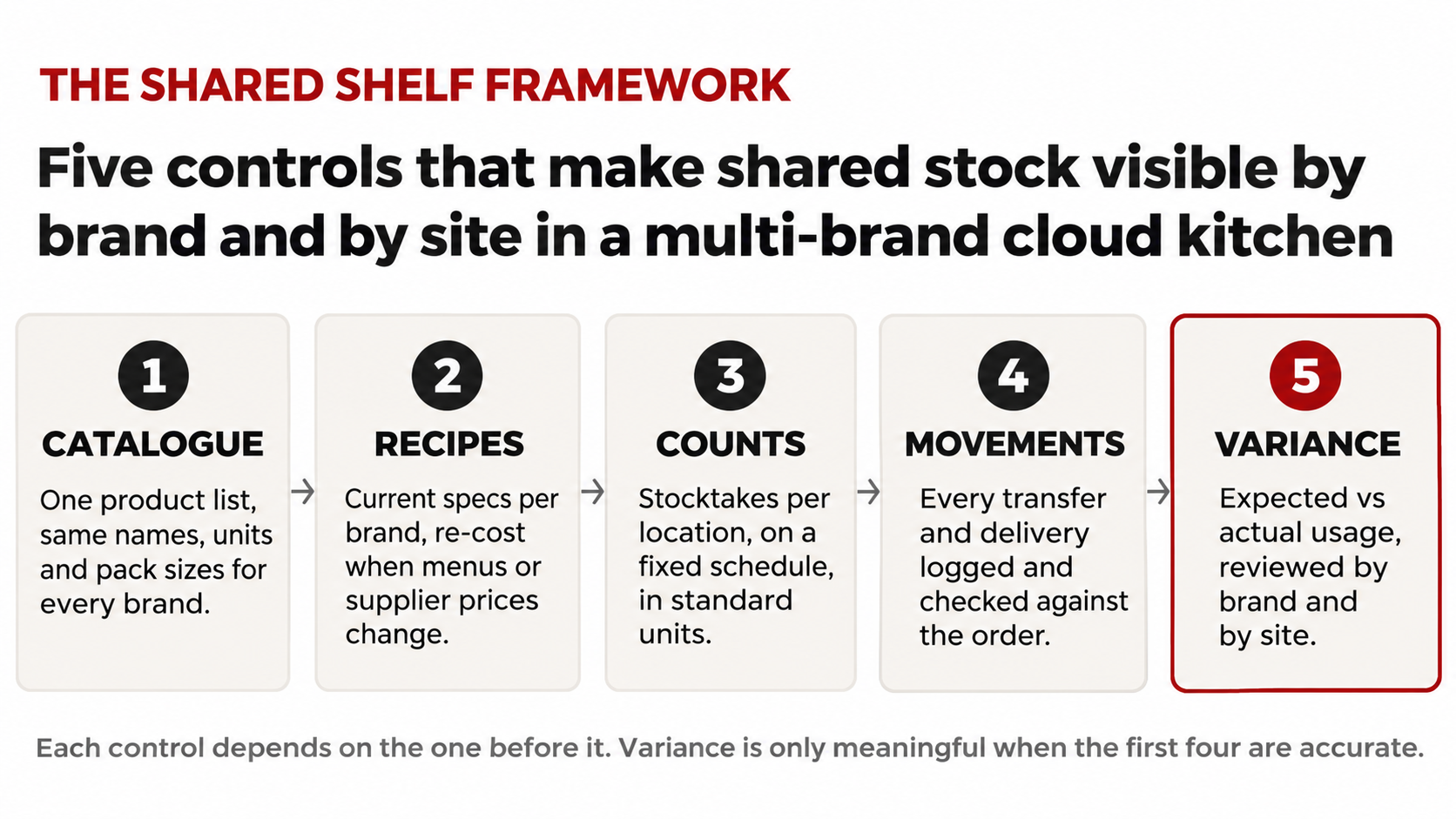
- The Shared Shelf Framework runs in order: catalogue, recipes, counts, movements, variance.
- Keep recipes current for every brand; stale specs distort theoretical food cost.
- Order against stock on hand, forecast sales and supplier delivery days, not habit.
- Review variance by brand and by site so the cause of every gap is visible.
Inventory management is not a routine admin task. It protects margin and lets the operation grow without losing sight of costs.
What makes multi-brand cloud kitchen inventory harder to manage?
How do shared ingredients complicate stock tracking?
One kitchen can prepare food for several brands from the same meat, vegetables, sauces and packaging. If stock is not monitored properly, it becomes hard to work out how much of each ingredient was consumed, and by which brand. Operators also lose sight of which products move fastest and where unexpected usage is happening.
Why do recipe and portion differences matter?
Every brand has its own menu, recipes and portion specs. Two brands can use the same ingredient in very different quantities. Out-of-date recipe data distorts theoretical food cost and makes it hard to compare expected usage with what actually left the shelf.
How does delivery demand affect stock levels?
Delivery demand swings with the time of day, promotions, location and how each brand performs on the apps. Order too much and stock spoils. Order too little and the kitchen cannot fulfil orders, which can take several brands offline at once.
What changes when you add more locations?
Expansion multiplies the complexity. Stock levels, suppliers and purchase prices can differ by site, so a group view is only useful if each location’s numbers are accurate first.
The table below shows how each pressure point changes between a single-brand restaurant and a multi-brand cloud kitchen.
|
Inventory area |
Single-brand restaurant |
Multi-brand cloud kitchen |
Control that holds it |
|
Ingredient demand |
One menu draws on each ingredient |
Several brands draw on the same shelf |
One shared product catalogue |
|
Recipes and portions |
One set of specs to maintain |
Different specs per brand for the same ingredient |
Standard recipes per brand, kept current |
|
Demand pattern |
Covers and bookings visible in advance |
App orders swing by hour, promotion and brand |
Orders based on stock, forecast and delivery days |
|
Stock location |
Usually one stockroom |
Stock split across kitchens and sites |
Counts per location and logged transfers |
|
Variance view |
One kitchen-level number |
A blended number hides which brand caused it |
Variance reviewed by brand and by site |
|
“Three brands, one walk-in. If the count cannot tell you which brand used the chicken, the P&L is guessing.” Illustrative operator view written for this article. Not a customer quote. |
How can you improve stock visibility across multiple brands?
Better inventory control starts with a clear picture of the products and ingredients the kitchen uses. We call the approach below the Shared Shelf Framework: five controls, applied in order, that make shared stock visible by brand and by site.
- Catalogue. Build one central product catalogue. Keep names, product types, units and pack sizes consistent, so shared ingredients can be traced across every brand and compared between records.
- Recipes. Keep recipes current in your recipe management system. Record the ingredients and quantities for each dish, then review cost and portion size whenever a menu or supplier price changes.
- Counts. Count stock per location. Central control matters, but never at the expense of site-level accuracy.
- Movements. Record every delivery and every stock transfer between sites. Check what arrived against the purchase order before it goes on the shelf.
- Variance. Compare expected usage with actual usage, by brand and by site. Investigate the gaps rather than relying on total stock value.
Each control depends on the one before it. Variance is only meaningful when the catalogue, recipes, counts and movements behind it are accurate. For the costing side of multi-brand menus, including packaging and channel commission, see our guide to costing delivery items in three layers.
What are the best practices for scaling cloud kitchen inventory?
Processes that work for one brand can become hard to manage across several. These practices keep the operation scalable.
How can cloud kitchen management software help with inventory control?
As brands multiply and share ingredients across locations, spreadsheets and manual systems start to break. Cloud kitchen management software with an inventory module brings product, recipe, purchasing and stock data into one connected system.
With StockTake Online, cloud kitchen operators can manage:
The platform runs in the cloud with no hardware, and it integrates with systems including Toast, Lightspeed, Aloha EPOS, TISSL, Grafterr, HubRise and Xero. Operators using StockTake Online can recover up to 3 to 8% of food cost within 60 days. Results depend on the starting position.
How do you add brands and kitchens without losing control?
Launching new virtual brands or kitchen sites creates growth, but inventory complexity grows with it. The answer is to put the right systems and procedures in place before the complexity arrives.
Accurate products, standard recipes, regular stocktakes and consistent purchasing all improve visibility. With those in place, operators make better decisions about ingredient use and cost.
Where should a multi-brand cloud kitchen start?
Running inventory for several brands from separate stock sheets does not need to be difficult. Start by reviewing your current stock process, mapping which ingredients each brand shares and finding where visibility breaks down. Then centralise inventory, recipes and purchasing so every brand works from the same data.
Run your best-selling delivery dish through the free food cost calculator first. Then explore how StockTake Online supports cloud kitchens. When you want to see connected inventory across your own brands and sites, book a demo.

Frequently asked questions
What is cloud kitchen inventory management? It is the process of tracking ingredients, packaging, stock levels, purchases and usage in a delivery-focused kitchen, so operators know what they hold, which brand used it and what it cost.
How do cloud kitchens manage inventory for multiple brands? They keep one central product catalogue, standardise recipes for each brand and track usage across all brands. Shared ingredients are tracked centrally, then variance is reviewed by brand to show where stock is going.
Why is ghost kitchen inventory management critical? Most ghost kitchens run several virtual brands from one or more kitchens. Accurate stock records help avoid shortages, reduce waste, support recipe costing and show how each ingredient is used across brands.
What features should cloud kitchen management software have? Look for stock control, recipe management, supplier and purchasing tools, delivery checking, stock transfers, reporting and multi-location inventory management in one connected system.
How can cloud kitchens reduce food waste? Run regular stocktakes, buy against real need, keep portions consistent, record waste as it happens and track ingredient usage against recipes so the causes of loss are visible.