


The restaurant procurement process links stock levels, par levels, supplier management and purchasing, so every order reflects what the kitchen actually needs. Done well, it takes you from a stock count to a checked delivery without guesswork, and protects food cost along the way.
Procurement is not ordering goods at the last minute when stock runs low. When ordering is manual, the same three problems repeat: over-ordering, shortages of key items, and slow reactions to supplier price changes. For busy kitchens and multi-site groups, those problems hit food cost, stock control and GP% at the same time.
This guide walks through the full path from par level to purchase order using a seven-step framework, the 7C Order Loop, plus a checklist you can use before your next order.
What is restaurant procurement?
Restaurant procurement is the sourcing and buying of everything a restaurant needs to trade: ingredients, drinks, packaging, cleaning supplies and equipment. It covers much more than choosing a supplier and placing an order. Effective procurement includes:
- Reviewing existing stock
- Working out requirements
- Setting par levels
- Managing suppliers
- Comparing purchase costs
- Preparing purchase orders
- Checking deliveries
- Analysing purchasing data
- Usage history
- Demand forecast
- Supplier lead time
- Ordering frequency
- Available storage space
- Seasonality
- Upcoming events and bookings
- What do we have now?
- What are we short of?
- What is moving slowly?
- What is already on order?
- Is the item sitting at another site?
- Current supplier prices
- Pack sizes
- Minimum order quantities
- Delivery terms
- Delivery days and cut-off times
- Product specifications
- Availability
- Supplier
- Products and specifications
- Quantities in the supplier’s pack sizes
- Agreed unit prices
- Delivery date, time and location
- Order reference and approver
- Missing products
- Wrong quantities
- Damaged goods
- Substitutions
- Price changes
- Pack size errors
- Procurement starts with an accurate stock count, not the order form.
- Order quantity is par plus expected uplift, minus stock on hand and stock already on order, rounded to pack size.
- Confirm supplier prices, pack sizes and lead times before every order; the cheapest line is not always the best value.
- Check every delivery against the PO and update stock from what was received, not what was ordered.
- The 7C Order Loop (Count, Compare, Calculate, Confirm, Commit, Check-in, Close) turns ordering into a repeatable process.
The aim is simple: hold enough stock to trade without interruption, without paying for stock that sits on the shelf.
What is a par level, and what should set it?
A par level is the target quantity of a product you should hold to cover demand until the next delivery arrives. If a kitchen typically works through 20 units of an item between deliveries, its par sits around that figure, plus a sensible buffer. The right par depends on:
Par levels are not fixed. Review them whenever demand, menus, suppliers or lead times change. For the calculation itself, see our guide on how to calculate a par level from usage, lead time and a safety buffer.
How do you get from a par level to a purchase order?
Every accurate order follows the same path:
|
On-hand stock → Par level → Order quantity → Supplier check → Purchase order → Delivery check → Stock update |
The more accurate each step, the better the information you have when you place the order. If the stock count at the start is wrong, every step after it is built on a weak base.
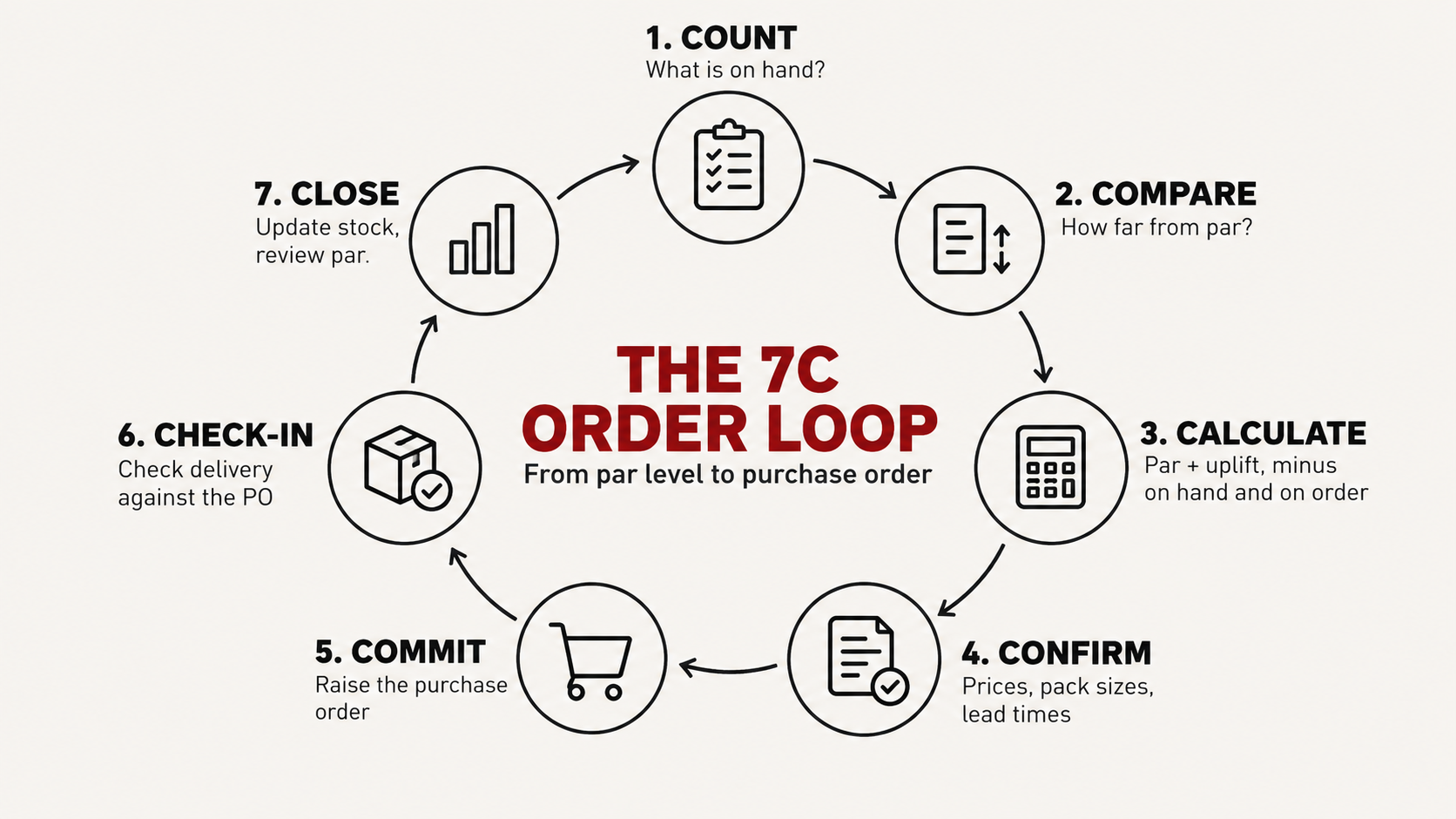
We break this path into seven steps, the 7C Order Loop: Count, Compare, Calculate, Confirm, Commit, Check-in and Close.
Step 1. Count: what do you actually have on hand?
Before ordering, the person placing the order needs to know what is already in the building. That sounds simple until stock is spread across kitchens, bars, stores and several sites. A regular stocktake answers the questions that matter:
Good stock control stops you buying products you already hold. If you still count on paper, the free stocktake app is a quick way to get a reliable count before the next order.
Do not ignore dead stock. Look beyond low stock. Items that have not moved in weeks tie up cash and storage, and usually signal a par level set too high. Flag them before you reorder anything in the same category.
Step 2. Compare: how far is each item from par?
With a reliable count, compare each line against its par level. The gap tells you which items need ordering and which can wait. Items at or above par should not appear on the order, however familiar the habit of ordering them is.
Step 3. Calculate: how much should you order?
The simplest purchasing formula is:
Order quantity = Par level − Stock on hand
A more complete version also accounts for stock already on order and expected demand, then rounds to the supplier’s pack size:
Order quantity = (Par level + Expected demand uplift) − Stock on hand − Stock already on order
|
Illustrative example. A site holds a 40 kg par for chicken thighs. The count shows 14 kg on hand and 6 kg already on order. A busy weekend is booked, so the manager adds 8 kg. The order is (40 + 8) − 14 − 6 = 28 kg. The supplier sells 5 kg packs, so the order becomes six packs, or 30 kg. |
This is par working from real figures rather than assumptions.
Step 4. Confirm: are your supplier details still current?
Supplier management is part of procurement, not a separate job. Before drafting the order, confirm:
Supplier prices move. Ordering from an old price list hides small increases, and small increases across many lines erode GP% quietly. If prices are rising faster than expected, it pays to benchmark and challenge supplier prices.
Price is not everything. The cheapest supplier is not always the best value. Quality, reliability, consistency and product specification all affect the true cost of a line. Good procurement balances price against the risk of a short or poor delivery on a Friday night.
Step 5. Commit: what should a purchase order include?
Once stock and supplier details are confirmed, raise the purchase order. Every PO should state:
A clear PO is also your record when the delivery arrives. If you raise many orders each week, automating purchase orders removes most of the re-keying.
Step 6. Check-in: what should you check when the delivery arrives?
Procurement does not end when the order is sent. When the delivery arrives, check it against the PO, line by line. Look for:
Record any discrepancy while the driver is still on site where you can, so credits are easier to claim.
Step 7. Close: how do you close the loop?
Update stock with what was actually received, not what was ordered. That keeps the next count accurate and closes the loop between purchasing and stock. Use each cycle to review pars too: repeated shortages or dead stock on the same line mean the par needs to move.
How does reactive ordering compare with par-led procurement?
|
Stage |
Reactive ordering |
Par-led procurement (7C Order Loop) |
|
Stock check |
A quick look at the shelf |
Counted stock across every store and site |
|
Order quantity |
Habit or last week’s order |
Par plus uplift, minus stock on hand and on order |
|
Supplier details |
An old price list |
Current prices, pack sizes and lead times confirmed |
|
Purchase order |
A phone call or text |
Written PO with quantities, prices and delivery terms |
|
Delivery |
Signed without checking |
Checked line by line against the PO |
|
Stock records |
Updated later, if at all |
Updated from what was received |
|
Typical result |
Over-ordering, shortages and surprise costs |
Orders matched to demand, with costs visible |
How does better procurement protect food cost and GP?
Purchasing is where food cost starts. Over-ordering creates waste and dead stock. Under-ordering creates emergency purchases and disrupted service. Paying more than budgeted erodes GP slowly unless menus and recipe costs are reviewed regularly.
The waste side is measurable. According to WRAP (2013), around 21% of food wasted in UK hospitality and food service outlets arises from spoilage, meaning food that expires before it can be used. Ordering to par, and checking what is already on hand, is one of the most direct ways to reduce it.
When purchasing and stock data sit together, you can base each decision on what the restaurant really uses. To see what your current numbers mean for margin, try the free food and beverage cost calculators.
How does technology support restaurant procurement?
Tracking purchasing across spreadsheets, emails, invoices and separate stock records is slow and error-prone. Restaurant inventory software brings stock control, purchasing, suppliers, recipes and food cost reporting into one platform.
StockTake Online’s restaurant procurement software holds par levels and minimum order quantities for each product, and handles the same product from different suppliers in different pack sizes. Supplier management with scheduled price updates keeps prices current before they take effect. Order and delivery management lets you approve orders, accept deliveries, record free-of-charge items and attach the delivery note, and live stock control reflects what was actually received.
For multi-site groups, one view across sites shows what each location holds and needs, so head office can see requirements and spend before orders go out. StockTake Online customers can recover up to 3 to 8% of food cost within 60 days.
The question changes from “what do I think we need?” to “what does the data say we should order?”
|
Illustrative quote, written for this article and not attributed to any real operator: “Most over-ordering isn’t carelessness. It’s a buyer ordering without knowing what’s already in the walk-in or on the van. Fix the count and the orders fix themselves.” |
What should you check before every purchase order?
- Current stock levels
- Deliveries already on order
- The par level for each line
- Expected demand
- Current supplier prices
- Supplier lead times and cut-offs
- Slow-moving and dead stock
- Storage capacity
- Events and seasonal demand
Working through this list before each order gives you tighter control of purchasing and a cleaner stock position.
Where should you start?
The procurement process starts well before the purchase order goes out. It starts with accurate stock data, current par levels and a realistic view of demand. Get those right and purchasing supports food cost and stock control, rather than working against them.
For growing restaurants and multi-site groups, connecting procurement with inventory management makes each order faster to build and easier to check.
Start with a free stock count, see how par-based ordering in StockTake Online turns counts into purchase orders, then book a demo to see the full workflow on your own products.
Frequently asked questions
What is restaurant procurement? Restaurant procurement is the process of sourcing and buying the food, drinks, packaging, cleaning supplies and equipment a restaurant needs to trade. It covers checking stock, setting par levels, managing suppliers, raising purchase orders and checking deliveries, not just placing orders.
What is a par level in restaurant inventory management? A par level is the target quantity of a product a restaurant should hold to cover demand until the next delivery. It is based on usage, expected demand and supplier lead time. Using par as the benchmark tells buyers how much to order instead of guessing.
How does supplier management affect food cost? Supplier prices, pack sizes, minimum orders and delivery terms all change the real cost of each ingredient. Small, unnoticed price rises across many lines push food cost up and GP% down, so prices should be confirmed before every order.
Should par levels change for busy periods? Yes. Adjust par levels for expected demand, seasonality, events, bookings and changes in trading pattern. A busy weekend or a large party needs more stock than a normal week, and pars should drop again once demand returns to normal.
Can restaurant inventory software help with purchasing? Yes. Inventory software links stock control, par levels, purchasing, supplier management and food cost data in one place. Teams can build orders from live stock, keep supplier prices current and check deliveries against purchase orders without re-keying data